
General
– Tape Machine have the Character to Compress the High Frequencies
– i.e. Rather Harmonic Compression (Not Classic Compression)
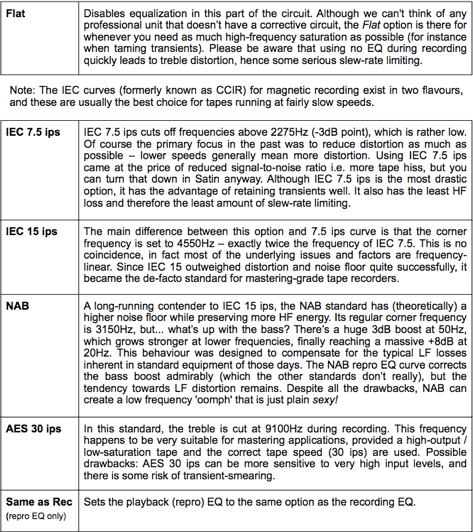
Speed ips
– Speed of the Tape in “Inches per Second” (Works with 15ips as Default)
– How Quick the Virtual Tape is Drawn Past the Heads (ips = in Inches per Second)
– Faster Speeds for Higher Fidelity, Less Noise and Cleaner High Frequencies (also the Lower Frequency Limit moves up slightly)
– Most common are 7.5. 15 and 30 ips, although Satin is Capable of Experimenting with “Unreal” Speeds Below 7.5ips
– Speed of Tape is Not Only Important for the High Frequency Response and Noise Level, but also for the Roll-Off in the Bass Response
Pre-Emphasis
– addresses the “Gap Loss” Phenomenon
– the Gap of the Repro Head Determines Its High Frequency Response (Smaller Gap = Better the Response)
– this Gap Loss Frequency is Proportional to the Tape Speed (7.5ips=4kHz, 15ips=8kHz, 30ips= 16kHz)
– somewhat Like a High Shelf EQ, but Influenced by the “Service Settings” (namely “Gap Width”)
– is Quasi a Compensation for Any Loss of High Frequencies Due to the Dampening Effect of the Tape Head (Compensation Before Recording and Does Not Increase Noise Floor)
– can also be Used to Artificially Increase High Frequency and therefore More Saturation Effects
– Affects the High Frequency Response and Frequencies that are Affected Depending on Tape Speed
Asperity
– Imperfections in the Surface of the Tape cause a Roughening / Blurring of the Program Material (Recorded Frequencies)
– Add some Kind of Enharmonic Distortion
– Asperity Causes some Constant Mid Range Noise
– High Frequency Content Reacts Sooner and Get a Noise Tail
– Works in Stereo and is Considered to even Make Mono Sources a bit Stereo-Like
Crosstalk
– Theoretically, in Stereo Multi-Track Recordings the Audio from Each of the Tracks Stays Perfectly in its Own Lane, but in Reality (Due to Magnets and Other Reasons Regarding Circuits) this is Not Always the Case
– so this Resulting “Crosstalk” is What Helps Magically Glue Tracks Together (Cohesive Sound)
– Adjustable from -20dB to -80dB
– Multitrack Recordings or Left / Right Channel of a Stereo Track should have Zero Crosstalk between Adjacent Tracks
– means a Superb Built Electronic Circuit is Nearly 100% Isolated, but still there are Edgy Currently or Other Unwanted Interactions in the Circuit
– Satin includes a Crosstalk because it can Help “Glue” Stereo Track Together
– Notice that “Crosstalk” will Not Apply to All the Group Tracks Collectively (i.e. Due to the Processing Amount Required it Runs on a Per-Instance Basis)
Wow & Flutter
– Similar to “Hiss” and “Asperity”, “Wow & Flutter” was One of the “Faults” or Inconsistency in the Transport Mechanism of the Tape Machine that Back then was Undesired
– i.e. in Satin you can Ensure Smoothest Tape Flow Possible (No Wobbly Recordings with Value at Zero)
– but a Little Variance in the Recording and Playback is OK
– this Feature lets you Add from Unnoticeable all the Way to Horrible “Wobble”
– Notice that the Speed of the Wow & Flutter Follows the Tape Speed
Bias
– Most Important Control in the Service Panel and Crucial for Achieving a Clean Recording by Flattening the Tapes Response Curve
– BIAS is Normally used to Flatten the Tapes Response Curve
– since this Setting is a Compromise Anyway, use it as a Creative Effect
– 0.00 (Default) is Satins Best Compromise, Flat Response without Too Much Distortion
– Lower Values Tend to Improve the High Frequency Response at the Cost of More Distortion (i.e. the Waveform Crosses Zero which means that Magnetisation is Low)
– Higher Values Result in Lower Distortion but Less Highs (Roughly the Opposite Effect)
- some Engineers Run Machines “Over-biased” for slightly Lower Distortion and a Cleaner Low-End at the Cost of a More Dampened Treble Response
Azimuth
– Ideally, a Magnetic Recorder has its Record and Repro Head Perfectly Aligned (Exactly 90 Degrees)
– a Mismatch in Azimuth Results in a “Washy” Sound, means Poorer Treble Response and with Stereo Signals “Tilted” to One Side
– i.e. when Used Off-Center, Azimuth Skews the Signal Slightly Away from the Vertical which Results in a Shifting of the Spatial Placement of the Source Material
– so when Necessary, “Azimuth“ lets you Adjust the Repro Head Position to Find the Ideal 90°
– but “Azimuth“ can also be Used to Re-Produce “Retro Effects” (Haas Effect), by Simply Setting it to a Custom Difference in Time/Phase
– Try it Along with the “Satin Delay” to Go for “Retro Echo Effects”
- Notice that “Azimuth” will Not Apply to All the Group Tracks Collectively (i.e. Due to the Processing Amount Required it Runs on a Per-Instance Basis)
Headroom
– “Headroom” Establishes the Amount of Headroom Before Distortion Occurs
– it is Mainly Thought to Balance / Match the to Recording Pre-Amp to the Reel Inside
– Because Often a Pre-Amp Starts to Distort whereas the Reel Would Not at this Point, so you can Adjust the Optimal Balance here
– by Default the Headroom for “Record” and “Repro” is Set to 9dB Above the 0dB Tape Level, Leaving some Room Before you Start to Hear the Circuit Distorting
– for Maximum Tape Saturation and Circuit Transparency, Setting Headroom at High Values is Recommended
– if you Aim for Gritty and Brickwall Type of Distortion, Use Low Values (but this Loses much of the Tape “Liveliness”)
Leave a Reply