
General
– Try to Set Recording Level for Mic/Line to approx. -18dBFS RMS/Average Volume (Not Peak) for the Sweet Spot, this translates to the Zero in a Analog Domain where Recordings also had to be Done Matching the -0dBVU as close as possible without Clipping and still provides Great Results
– be aware that the “-18dBFS” Mark may be Different with every Converter, plus DAW´s Meters may show the -18dBFS Mark differently
– also Check in your DAW to what “Readouts” it is currently set, does it Display Peak or RMS
– therefore Check the Converters Specifications, Test your DAW´s Meters with a Sine Tone at -18dBFS and use 3rd Digital Meters / VU Meters to Double-check
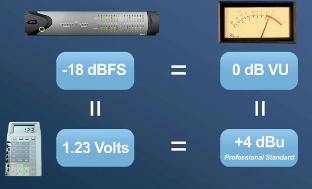
– Notice that in the Reality, the Relationship between Analog Levels and Digital Levels is “Conditioned” by what the Converters are aligned to (“0Vu” = “+4dBu” (Professional Standard) = “1.23 Volts” = “-18dBFS”)
Test the -18dBFS (0dBVU) Mark across Meters
1) Set up a Single Signal/Test Tone Generator plug-in across a Mono Channel
2) Be sure there are no other plug-ins on the same Channel
3) Pan to Center & Set the Fader to Unity (+/- 0dB)
4) Set the Generator to function at -18dBFS, preferably with a Sine Tone
5) This should give you a steady reading of the Meter at the a fore mentioned -18dBFS at the Master Stereo Out
6) Now Check the reading at the Stereo Buss with the Fader set to Unity and the Pan of the Test Signal Channel set to Center
7) Be sure no other plug-ins are Active on the Channel or Stereo Buss and the Fader Level is also at Unity (+/- 0dB
8) Pan the Channel with the Generator plug-in, either hard Left or Right
9) Notice any Change at the Stereo Buss
10) This should not only give you a better understanding of where -18dBFS is on your Meters, but how your DAW’s Gain Structure
Cubase Mixer Fader / Meter
“-18bBFS” equals:
A) Input on the recording track, -15 Peak Meter (Meter #’s are difficult to read) which aligns almost to -5 on the Fader marker;
B) -18 Peak Meter on the Stereo Master Out Buss which aligns to about -6 or -7 on the Fader marker;
C) -21 RMS Max on the Control Room “Digital Scale” (set to -18dBFS) and -18 on the Peak Max Meter;
– Notice that both Control Room Meters show their black Peak Hold line to be -18 on this Meter
– These were obtained by using a Sine Wave Tone set to -18DB. Tested at 440Hz and later at 1KHz
Leave a Reply