
General
– Human Hearing is Not Linear
– when we Reduce a Sound to Its Halfs (50% Left Speaker and 50% Right Speaker), the Perceived Sound Does Not Add to 100% in Loudness
– thus 2 Speakers Playing the Same Sound Will Not Double the Volume, Because their Frequencies will Saturate Inside in Our Inner Ear Instead Adding them Linearly
– if you Pan a Sound to the Centre, the Signal is Coming Out of 2 Speakers
– if you Pan Hard Left / Right the Signal is Coming Out of Only 1 Speaker, hence the Level is Lower as it only Comes through 1 Speaker
– Logically, the Centred Signal is Louder as Twice the Wattage is Pushing It
– the Hard Panned Signal Loses in Theory -6dB, but Due to Sounds Complexity it is about -3dB
– so when we Position the Same Signal (Monaural Sound) to Both Speakers to the Centre, this Creates the Illusion the Sound is Coming Direct from the Middle (even if we Not have a Centre Monitor)
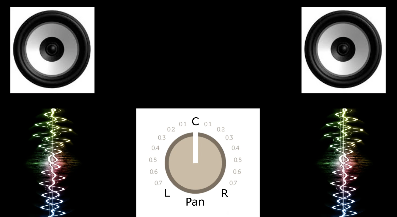
– the Downside of this Technique, if we Take a given Signal and Put it to 2 Speakers instead of 1, it Cuts the Signal Going into each Speaker in Half, which is about a Drop of 6dB in Level in Each Speaker
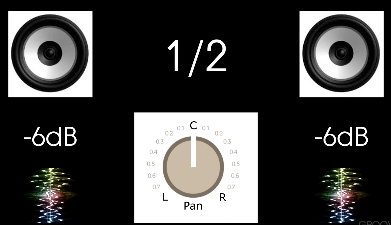
– this Lost in Level can be Tricky if you Do Not Care about it
– in a Perfect Real World Environment you Should Not Notice that Drop in Level (it should Combine to the same where 1/2+1/2=Whole again), but Room Ambience and Acoustics affects this Level
– means we Tend to Hear a Drop in Volume when we Pan to Middle vs Panning to One of the Speakers
– also when we move the Pan Knob from Hard Left to Hard Right, we will Not Hear the Level Consistent throughout
– thus at the Centre Position the Sum of the 2 Channels Sounded Louder than if the Signal was Panned Hard Left or Right and it became Common to Use Logarithmic Gain Change Response to Drop Signal by -3dB RMS at the Centre
– so the DAW will Compensate via Pan Law Project Settings Automatically” for that (as if you would Re-Adjust the Level After Panning to be Equal Loud as the Centred Level)
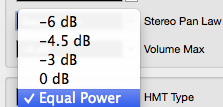
– this is Why any DAW gives you the Option to Compensate by Increasing the Volume a bit as the Signal is Panned to the Middle (mostly by default on -3dB instead of a Natural Decrease by -6dB)
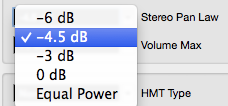
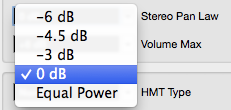
– in Cubase you Adjust that per Project in “Project Pan Law”

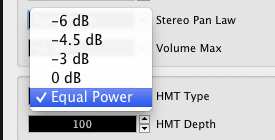
– the Project Pan Law Setting must be Defined before Mixing or it will Affect the Mix if you Change it afterwards from say -3dB to -6dB (may Clip)
– the same if you Bring a Project to a different DAW, make sure to Set Pan Law to the same in Target DAW
– as there are No Universal Rules of How Loud the Adjustments should be, the Range of Compensation can be from 2.5dB to 6dB (i.e. a Pan Law Setting of 2.5dB would Amplify a Hard Panned Signal by 2.5dB)
Pan Law Testing
– to Test that Phenomenon, Bounce a Tone Generator Sine Wave to a Mono Track
– Do Not Copy a Tone Generator Plugin Twice for such Tests, as they Not Generate Exact Same Results Over Time
– Pan Law will Attenuate Level in a Logarithmic Way when Panning Towards the Sides (e.g. Logarithmic between Centre at 4.5.dB and Sides at 0dB when Pan Law is at 4.5dB)
1) Generate a Sine Tone at any Frequency and Level (here 330Hz at -23dB)
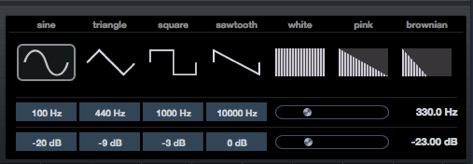
2) Record that Sine to Audio, 1x in Mono and for Comparison 1x in Stereo
– be Sure that No Reverb, Reference Monitoring etc. is in the Loopback Recorded Signal
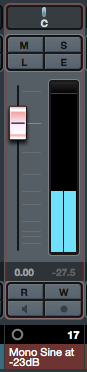
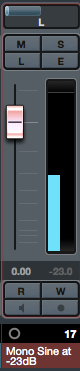
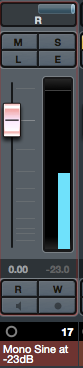
3) Start to Pan a Mono Signal to either Side and Look at the Level Meter, then Switch to Centre and Look at the Difference
– while the Mono Sine is Affected in Level Changes when Panning, the Stereo Sine Does Maintain the Initial Level at any Position
4) Notice that Project Pan Law Compensation affects only Signals anything other than Hard Left or Hard Right
– i.e. the Level Hard Left or Right is Consistent and Only Signals but that get the Compensated Volume
Mono Sine / Pan Law at Equal Power
– Centre Signal is Constant Loud, i.e. will be Corrected No Matter what Position
Center Left Right
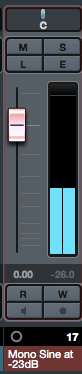
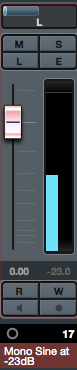
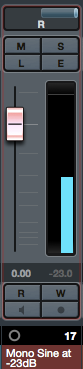
Mono Sine / Pan Law at -4.5dB
– Centre Signal will be Attenuated by 4.5dB
Center Left Right
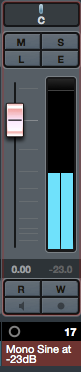
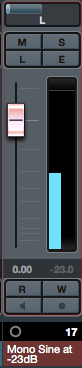
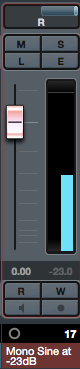
Mono Sine / Pan Law at 0dB
– Centre Signal is De-Facto Louder (No Attenuation)
Center Left Right
Leave a Reply