
Table of Contents
General
- also Known as “Key Tracking” and Works Primarily in Synths in Conjunction with Modulation
- basically means for every Octave you Move Up or Down the Keyboard, any Assigned Parameter (be it Filter Cutoff etc.) also Changes by an Octave
- often you Assign it to Modulation that Works with “Hz” (Frequency), so the Harmonic Content of the Signal stays Consistent
- i.e. Key Tracking allows you to Automate the Modulation of certain Parameters in Relation to the Notes being Played (so an LFO via 100% Tracking Depth Gives Low Notes Slow Modulation Rate and High Note Fast Modulation Rate)
- Note that “Tracking” Depth and Key Follow Extra Features Very from Synth to Synth, means it depends on where 100% Key Tracking really occurs (for Example Zebras KeyScale/Follow Pivot Note is E3/52)
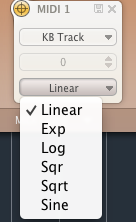
- though in Most Cases the Response is Linear, there are basically different Possibilities
- some Effect Plugins, such as Volcano 2 have this Feature Implemented as well (as it has a Modulation Section)
Key Follow Example
1) Create a Patch with No Modulation at all
2) Set “Key Follow” for the Filter Cutoff to 100%
3) Then Adjust Cutoff to Taste for a Particular Note (can be Done by Ear or using an FFT if Exact Harmonics need to Present)
4) Now Playing across Keyboard Register, all the other Notes will have the same Harmonic Content (Audible Overtone Series)
5) Note that any Modulator come into Place afterwards Vary the Harmonics Due to the Level of each Modulator over Time
Leave a Reply