
General
- there are Quasi 4 Types of Compression / Expansion
- Downward Compression, Downward Expansion, Upward Expansion and Downward Expansion

Downward Compression
- Downward Compression is Standard when People Using the Word “Compression”
- a Signal is Brought Down in Level when it Crosses the Set Threshold, i.e. Audio that is Above the Threshold will be Compressed by the Ratio You Set
- Downward Compression Reduces the Dynamic Range

Example Downward Compression
– Compress Just the Snare Frequencies every Time it Sounds, but Not Cut Surrounding Frequencies Quiet as Much
1) Exact same Setup as Expansion Example 2 but in Compression Mode
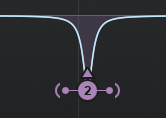
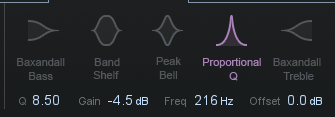

2) Means that the Actual Snare Drum Frequency will be Compressed but the Surrounding Frequencies Stay More or Less the same
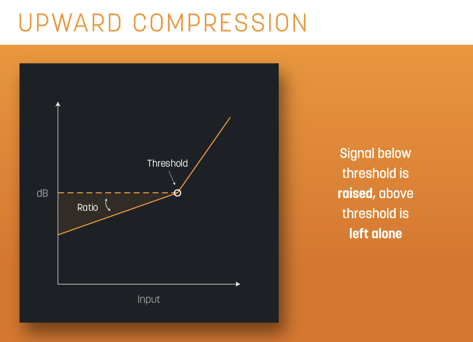
Upward Compression
- Upward Compression is the Exact Opposite of “Downward Compression”
- Sometimes Called “De-Expansion”
- when a Quiet Signal Falls Below Set Threshold Its Brought Up in Level (Works from the Opposite of the Spectrum vs Compression), i.e. Audio that is Below the Threshold will be Made Louder by the Ratio You Set
- Upward Compression Reduces the Dynamic Range
– Peaks are Untouched
- Use Upward Compression to Bring Up the Room Information Even More while Leave the Higher Level Untouched
– i.e. Commonly Used to Bring the Gain Up of the Quietest Parts of a Signal, Does Not Affect the Peaks
Example Upward Compression
– Boost Frequencies Around the Snare, but Compressing the Actual Snare Hit
1) Exact same Setup as Expansion Example 1 but in Compression Mode
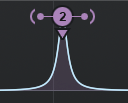
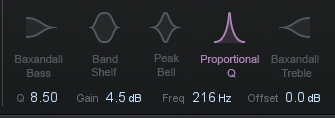

2) Means that the Actual Snare Drum Frequency will be Compressed but the Surrounding Frequencies get a Boost by 4.5dB
Upward Expansion (Dynamics)
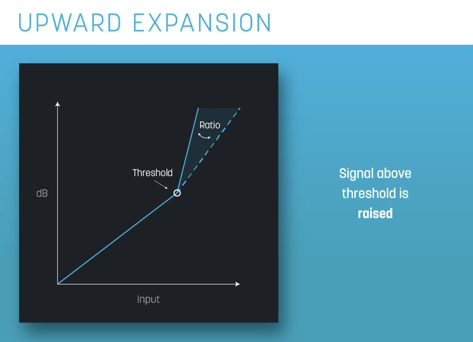
- it Affects the Louder Signal as it Crosses the Threshold and Instead Clamping Down it Pushes the Sound Up in Level
- Instead of Clamping Down on the Signal, the Expander Pushes the Sound Up in Level and Expands the Overall Dynamic Range of the Signal by Making the Loud Signals Even Louder (i.e. Peaks will be Even Louder with Upward Expansion)
- Upward Expansion Works the Opposite of Compression which Decreases the Volume or Louder Element and it is Based on an Expander, i.e. Audio that is Above the Threshold will be Made Even Louder by the Ratio You Set
- Sometimes Called “De-Compression”
- thus Upward Expansion Increases the Dynamic Range
- Although Both, Gate and Expander May Include the Same Parameters, the Difference between Both is the Amount of Ratio Where Higher Values (above 40) Act as a Gate and Below 40 it Acts as an Expander
- the “Range” Parameter (as Seen in Other Dynamic Plugins and Sometimes Called “Noise Floor”) is Simply an Option to Limit the Amount of Maximum Gain Reduction and Determine How Much of the Signal can Still Pass Through, e.g. when Settings this to 40 then the Gain Falls to a Maximum of -40dB thus Signals Above 40 Still Pass Through but will be Dropped to -40dB
– the Benefit of Using Expansion Instead a Static EQ to Raise Certain Parts of the Frequency Spectrum is Obviously that it Acts Dynamically, thus Only Does Something when the Threshold Raises Above a Certain Level while Leaving the Signal Untouched when it Does Not Crosses the Threshold
Example Upward Expansion
– e.g. Give the Snare Some More Bite, i.e. Boost just the Snare Drum every Time it Sounds
- Target the Specific Frequencies
– e.g. Target Snare Frequencies with a Band Pass Filter to Around 650Hz to 5kHz
Search the Frequency of Just the Body of the Snare Drum Frequency (Narrow Q)

- Set Mode of Dynamic Tool to Expand (and Not Compression)
- i.e. Set to Expansion Mode (i.e. “Inverse Mode” of Compression) with a Rather Fast Release
– i.e. this Way Only Snare Drum Frequency will be Expanded / Boosted by 4.5dB, whereas the Surrounding Frequencies stay More or Less the same
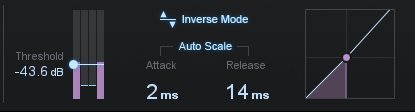
- Optionally Set the Mode of the Dynamic Tool to “Mid“ to Only Push the Mid Signal of the Snare
4) Play with Threshold so that the Signal Exceeds the Threshold
5) Reduce the Output so the Audio is the Same Loudness as Before the Effect was Introduced
6) Start Tweaking the Knee, Ratio and Attack/Release Settings so it Works Musically with the Rest of the Mix
– e.g. Very Quick Attack to Push Transients Up and Moderate Release to Return Naturally to Original Level, i.e. Approx so it Comes Back to Original Level Before the Next Hit
Downward Expansion
- Simply Called “Expansion” or “Expander”
- Downward Expansion is Based on a “Gate”, i.e. Its the Very Process that Powers a Conventional Noise Gate
- i.e. Audio that is Below the Threshold will be Made Even Quieter by the Ratio You Set
- thus Its Similar to Upward Expansion but with 1 Fundamental Difference, when Signal Drops Below Threshold it Pulls the Signal Even Farther Down Toward the Noise Floor
- Use Downward Expansion to Reduce the Quietest Parts of a Signal, e.g. Emphasise Transients but Downplay the Atmosphere, or for Reverb Reduction and Full On Gating

Downward Expansion Example
– Cut Frequencies Around the Snare (Cut Sustain Parts), but Not Cut the Actual Snare Hit Quiet as Much
1) Set a Cut Around the Snare Frequencies by Reducing Gain
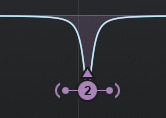
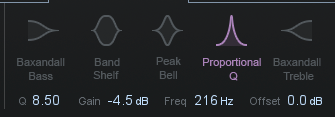
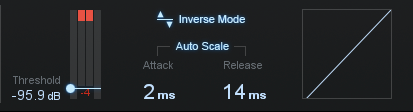
2) Means that the Frequencies around the Snare Drum Frequency will be Compressed, but every Time the Snare Crosses the Threshold the Gain Reduction is Lifted Slightly allowing more of the Snare through
3) In this Setup the Band is Acting more like a Gate
Leave a Reply