
General
- Mono Appears Often on Mobile Devices, Bluetooth Speakers, Background Music Systems, Many PA Systems (Especially Auxiliary Fills)
- a Good Mono Mix Is Crucial for Mono Systems and will Sound Great on Stereo Systems, while a Good Stereo Mix does Not necessarily Sound Good on a Mono System if the Phantom Center is Weak in the Stereo Mix
- of Course a Mono Mix can Not Replace a Good Stereo Mix as a Stereo Mix Adds Depth and Width, will Always Sound Bigger and More impressive
Stereo Recording Background
- Stereo Recording Techniques became Popular when Blumlein Placed a Pair of Microphones Together as Close as Possible and then Angled Them 90° Apart, so the Result was a Different Signal for the Left Channel and Right Channel
- i.e. so Close that the Signal Arrived at the Same Time with No Timing Differences and the Left Channel and Right Channel were Perfectly In Phase
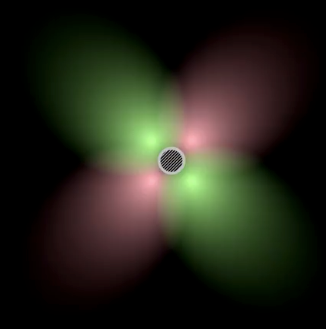
- while the Blumlein Stereo Recording is Phase Free per Se, Hearing the Recorded Signal Over a Stereo Speaker is Not Due to the Following Facts:
a) when you Sit on Front of a Stereo Monitor System You Hear Both Channels on Both Ears but the Left Ear Receives the Right Channel with a Slight Time Difference (Phase Shift) and a Filtered Combination of Both Channels by Your Head
b) Viceversa the Right Ear Hears a Delayed Signal from the Left Channel and a Filtered Combination of Both and this Difference is a Phase Shift to Which we are Very Sensitive
Simple Tricks to Spread Mono to Stereo
- Turn the Stereo Mix Down for the Reverb (i.e. Make the Reverb Mono Inside the Plugin) and the Pan the Reverb Hard Left or Right via the Pan Pot, or Pan the Reverb to the Same Position as the Dry Signal
– the Same Reverb Panning Technique can be Used on Delays, i.e. Pan the Delays Hard Left or Right via the Pan Pot or Pan Them to the Same Position as the Dry Signal
- Use a Haas Effect by Introducing a Phase Shift on 1 Channel, but Do Not Use the Same Settings More than 1 Time in a Project to Avoid Increasing Comb Filter Effect, i.e. Change the Delay Time (Haas Effect) for the Competitor Sound Properly, Remember to Switch Output to Mono to Test the Mono Compatibility of the Haas Effect (Range between 1ms to 3.5ms is Often Enough and Never More than 30ms to 40ms)
– Another Way is to Copy the Haas Effect but Instead Changing the Delay Time Try to Invert the Polarity, or if Already Inverted Flip it Back In Phase which Gives the Opposite Comb Filter Effect and the Maximum Possible Separation between 2 Parts
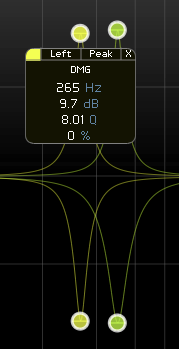
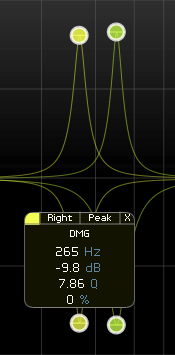
- Create Opposite Cut and Boost for the Left and Right Channel, e.g. Boost Left Channel at 250Hz but Cut at 360Hz, then Do the Same for the Right Channel but the Opposite Way, i.e. What You Boost on the Left You Cut on the Right and Viceversa
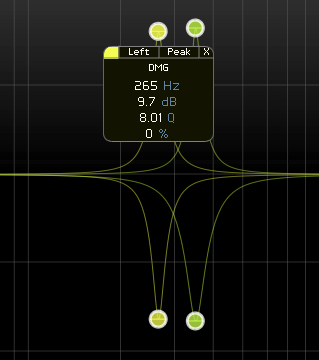
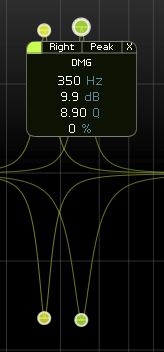
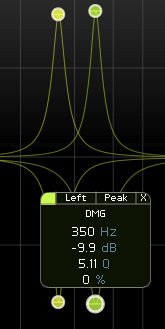
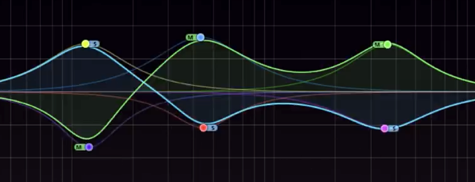
- Another Opposite Technique (which Requires Some Sort of Side Signal Already Present) can be Used in Mid / Side Mode, e.g. Boost Mid Channel at 500Hz but Cut Side Channel at 500Hz, can be Used Over Several Bands, of Course you are Not Limited to Boost/Cut at the Same Frequency but Use Individual Mid / Side Bands at Individual Frequencies to Control Mono Compatibility while Doing a More Focussed Mix
- Record a Part Twice and Pan Them Hard Left / Right, Requests a Part to be Performed Nearly Identical, but the Resulting Phase Shift between the 2 Performances is What we Consider as Width and can be Used to Spread Mono to Stereo
Leave a Reply