
General
– if you Compare a Kick Drum in Old Recordings vs Modern Recordings, it is Obvious that the Sound has Changed
– the Usage of EQ and Compression is No More Limited than Back then
– in the 50, 60 70 and Even Up to the Invention of the SSL, an EQ had (if at All) 2 Bands and Even the Frequencies were Fixed
– Today, More Things are in Front, i.e. the Microphones are Closer to the Sound Source which Causes Issues which Again, the Equalizer can Fix
– we Expect a Certain Sound and this is an EQ Driven Expectation
– also the Density of Layers have Increased and All this has to Go through a Stereo Mix, thus it is Impossible Today to Not use an EQ
– Back then, with a Proper Mic Technique you Could Make a Records Without EQ at All, as the Amount of Layers were Small and Just Fit into the Room
– George Massenburg Invented the “Parametric EQ” which Made a Big Difference
Look and Remove a Bad Frequency
– Primarily Look to Remove Bad Frequencies and then Enhance
– a Good Key Strategy (Counts for Any Step in your Life) is, Before you Touch Anything you have to have to Force Yourself to Imagine “What you Want?”
– Get Yourself a Mental Picture of Where Too Much Mask is
– Musically Said, if you Start Fuzzing & Moving Things Around in a EQ, you are Screwed
– Because if you Touch the EQ without an Idea, you Change the Original Picture Already and this Leads to the Next Error
a) Does it Need EQ?
b) Decide Analytical
c) Do you Want it Processed?
d) Do you Want to Sound it Transparent, Floating as if there is No Speaker?
e) Is there a Little Bit of a Mask?
d) Something Too Much?
e) What can you Clean Out?
f) Is the Signal Really Tall in the Vertical Axis? (Enough Breath?)
in General:
– this is an “Regular” Approach to EQ, i.e. Not for Sound-Design or as an Extreme Effect
– as the Overall Changes are Meant to be Subtle and Dedicated to Frequency Masking (Rather than Add to the Gain), you can Even Ignore to Compensate the Gain
– Very Small Q Factors are Not the Best Way to Use in a Mix (Either Re-Record or Change Sample)
a) Narrow Q = Cutting Frequencies (Cut Places that Bother Me)
b) Shelves = Boost Frequencies (Try First Shelves to Boost Frequencies)
c) Wide Open Q = Enhance Frequencies (Alternative to Shelves to Boost Frequencies)
d) if you have to Clean a Signal (Subtracting EQ Like High Pass and Cuts), Do that Before Compression (to Remove the Problem and Not Compress it to Make it Louder)
e) if you have to Enhance a Signal (Add a Lot of Bottom), Do that After Compression (so the Compressor will Not Fight Against it)
Mental EQ Technique
– Instead Boosting and Searching, you Simply Cut Along the Spectrum and Find/Clear the Masks that Way
– a Lot Harder at Fist Glance, but you Force your Brain to Work Harder and with Training you will Find Much Faster to the Right Spot (3-4 Weeks)
1) i.e. Create a Peak Band with Negative Gain Around -1dB with a Q of 7 (Epure)
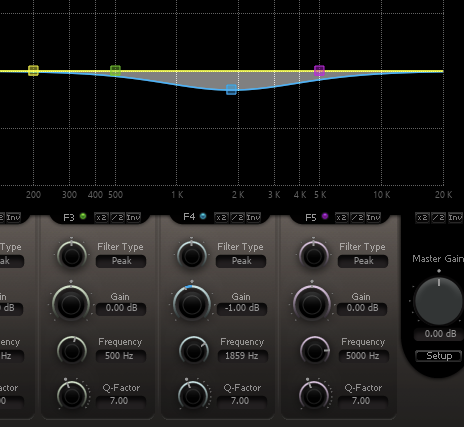
2) Find the Frequency, Guess it or by Intuition
3) Narrow the Q to the Strict Minimum Q Possible to Get the Effect you Want
– i.e. To Touch Only the Desired Spectrum and Do the Least Amount of EQ Possible
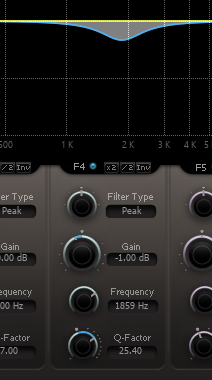
Basic Peak & Cut Technique
– Notice that this Method is Not as Sophisticated as the ”Mental Cut Technique”
– the “Problem” with this Method is, when you First Boost a Signal to Search for the Bad Frequencies you will then Cut Too Much as the Ear has Lost the Relation to the Original
– Nevertheless, this Method can be Good in Situations when you are Lost to Get Back on the Road
– but if you have a “Mental Picture Projection”, Go for the
1) Take a Peak Band Filter and Boost the Frequency
2) Then Look for the Bad Frequency and Remove it (Epure has an Invert, so Boost, Search and Invert)
– Do Not Get Too Fast Over the Spectrum when Searching or you May Miss the Actual Masked Area
– Do Not Use Too Narrow Peaks or Heavy Gain, Because you Increase Resonance and Masks
3) Best is to Stay Pre-Tamed in Both, the Q and the Gain
Leave a Reply