
Table of Contents
General
- All Streaming Platforms Look at the Average (Integrated) Loudness and at the True Peak (Headroom Against 0dBFS Preserved for Lossy Encoding) to Measure How Much a Track can be Attenuated or Boosted
- i.e. You Could have a Short Term Loudness of More than -14dB LUFS During Program Material but the Integrated Loudness Must Not Exceed 14dB
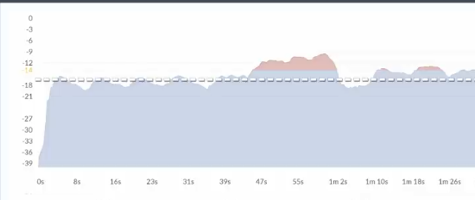
- Spotify Loudness Target is -14dB LUFS, Measured with ITU 1770
- they Normalize your Entire Album so the Level is Consistent between your Album Tracks
- and / or they Measure Individual Tracks when Shuffling between Playlists
- Spotify Does in General No More Use a Peak Limiter that Increases the Gain for Quieter Tracks, Instead it Simply Adds Digital Gain but Always Leaving -1dBFS Headroom for Lossy Codec Conversation
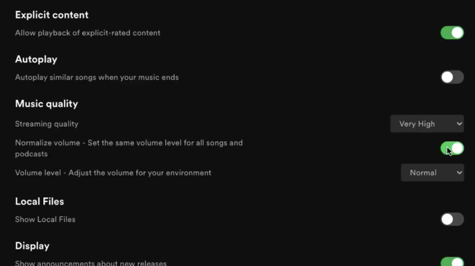
- but there Still is an Option for Premium Listeners to Enable a Either -11dB / -14dB or -23dB LUFS Listening Option that then Uses a Peak Limiter to Reach those Targets
Negative Gain
- Negative Gain is Applied to Tracks that are Louder than -14dB LUFS
- thus No Distortion as Gain is Simply Lowered
Positive Gain
- Positive Gain is Applied to Tracks that are Quieter than -14dB LUFS
- but Always with 1dB TP Headroom to Avoid Artefacts for Lossy Codec
- e.g. a Track with -20dB LUFS and a True Peak of -5dBFS Gets 4dB of Gain and therefore Only Reaches-16dB LUFS on Spotify (i.e. they can Only Increase the Track by 4dB Since the True Peak is -5dBFS (-20dB LUFS + 4dB = -16dB LUFS with Still -1dBFS Headroom for Lossy Codec Conversation)
- this is Important to Know, Because if You Would have the Track with -20dB LUFS and a True Peak of -7dBFS, they Could Push it by 6dB so your Track Exactly Meets the -14dB LUFS (-20dB LUFS + 6dB = -14dB LUFS with Still -1dBFS Headroom for Lossy Codec Conversation)
Workflow
1) Target the Loudness Level in Mastering to -14dB Integrated LUFS with a -1dB TP Headroom
- this is the Best for General Spotify Loudness Normalisation Listening Experience with Lossy Format Over Such as Ogg/Vorbis and AAC Targets
- i.e. Look at the Integrated Level Meter and Increase Limiter Input Gain (or Ceiling etc.) so it Matches -14dB Integrated LUFS
2) But Remember, Step 1 is Only the Best if People Enable Loudness Normalisation Over Spotify, but if Not or when it is Not Available then -14dB LUFS is Too Quiet for the Competition
- i.e. if People Disable Loudness Compensation then the Tracks in a Modern Music Playlist Go up to -6 / -7 / -8 Integrated LUFS
- this Leads you to also Consider Making the Master as Loud as Possible Without Sounding Bad
- e.g. Use Waveshaper / Peak Limiter etc. and in the Case of Targeting a Louder Competitive Master Use -2dB TP Headroom
- i.e. Look at the Integrated Level Meter and Increase Limiter Input Gain (or Ceiling etc.) so it Matches e.g. -6dB Integrated LUFS to be Competitive (but Notice that it will be a Challenge to Make it that Loud and also Sound Good)
3) So in General, Make 1 Common Master for All Streaming Platforms with the Given Information Above
- Just Look at that it has Enough Dynamics and Stick within the -12 to -16dB Integrated LUFS
4) But Avoid Overly Dynamic Music, i.e. Really Huge Changes in the Program Material
- Because the Streaming Measurement Algorithm will have Problems to Know Which Part is Relevant for the Integrated Measurement
- this Leads to Wrong Applied Gain Decisions and Finally Cause Clipping Issues on Some Playback Devices
5) For Promotional Uploads to Tik Tok, Instagram, Facebook, Make a Second Master and Use -2dB TP Headroom
- i.e. they Convert to the Most Compressed Formats at Lowest Bitrates and Only -1dB TP will Likely Distort After Encoding
6) Always Make Backups of Your Original HQ Renders in the Case a Loudness Target Changes or You Need it to Encode / Upload Again
Leave a Reply