
General
– This is About “Unison” and “Detune” Features in Synths Along with “Voices”
– basically it is about Creating Additional Voices in a Synth, as if a Real Singer Doubles (Unisono), its Verse which will by Nature Never Sound Identical
– so also in a Synth, you Do Not Copy a Sound Exactly the same, the Duplicate is always Detuned and Delayed to the Original (otherwise you Mess with the Phase, Hit the 0dB Mark soon or it Starts to Crackle)
– so “Unison” is Nothing else than a slightly Different Pitched 2nd Voice Against the 1st Voice that is Detuned and Delayed
– as a Side Note, the “Chorus” Effect is very Similar to “Unison” but Differs in that the Amount of Detuning is Modulated (Changed Over Time) by a Dedicated LFO (together with Detune and Delay)
– but Unison Does Not use LFO Modulation, Instead it Provides Control over the Amount of Duplicates used Instead (together with Detune and Delay)
– a Method to use the Exact Same Instrument, but slightly Adjust its Frequency a Bit Lower or Higher
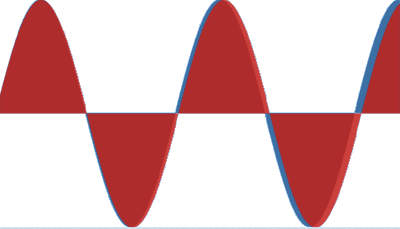
– e.g. say you have a 100Hz Sine Wave, the Duplicated Sine Wave Voice would be Set to 98Hz (Instead 100Hz), which Looks Like this
Details
– a Normal Detune would simply Tune a Oscillator against the Fundamental, just the Normal Way the Semi / Cents Work (this Affects every Voice and Note)
– but “Unison Detune” Comes into Place used when the Synth is Set to a Given Unison Mode such as “Dual” or “Triple” etc., which in this Case would Create a 2nd or a 3rd Voice Along the Original
– in this Case “Detune” Affects the Tuning of the Created Voices Inside the Particular Oscillator, i.e. Detunes them against Each other for the Amount you choose
– further you can Influence the Spreading of the Individual Voices in the Stereo Field with an Additional Parameter such as a “Width” (Zebra) or “Widening” (Mpowersynth)
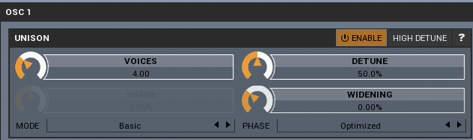
– the Term “Unisono” means “Together”, so it Starts with 2 Voices (1 Voice is Not Unison)
– Synths have their Limits on the Usage of the Unison Feature, Related to Maximal available Voices
– some Synths Provide a Number of Settings to Influence as well the Behaviour per Voice
– often a Synth also Features its “Voices Settings” where you Specify with How many Notes the Synth Operates in General
– basically, Playing 1 Voice with 1 OSC Costs you 1 Voice and Using the OSC in Unison Mode Costs you 2 Voices
– often a Maximum of a Unisono of 1 per OSC gives a Perfect Result, which for 3 OSC will Fatten the Sound 3 Times the Original and Costs you 6 Voices, i.e. 3 x 2 Voices (you will Not Benefit Sound-Wise from more Unison Amounts)
– Regarding the Limits, if a Synth has 10 Voices and you Set Unison to 10, the Synth can only Output Mono
– or say you have Maximal 6 Voices and you Want to Play a 3 Note Chord, you can Unison only 1 Time
– Notice that some Synth have “Super-Saw” which just per se a Unison Mode Oscillator Type
Unison / Polyphony / Voices Examples
1) Say the OSC is Capable of “6 Times Polyphony”
2) This means a OSC has 6 Voices available, i.e. you can Play Maximal 6 Notes at a Time per OSC
3) If you then Set a OSC to Unison Mode (Dual), you Lose 1 Voice, i.e. you can Now Play Maximal 5 Notes at the a Time
4) But for the OSC you have Set to Unison Mode, the Benefit is that any Note you Press Comes in 2 Voices which Detuned to Each other by the Detune Amount you Set it to
5) On the other Side if you Play a 3 Note Chord on a “6 Times Polyphony” Synth, you could Set Unison to Maximal 1
– Each Note of the 3 Note Chord Needs 1 Voice More which is 1+1, 1+1, 1+1 = 6)
6) So if you would Set Unison to 2 and Play a 3 Note Chord, you theoretically would Need “9 Times Polyphony”
– Each Note of the 3 Note Chord Needs 2 Voices More which is 1+1+1, 1+1+1, 1+1+1 = 9)
– in this Case the Voices are usually Taken from the Previous Played Keys, Hence Not the Full Sound you would Expect it to
Leave a Reply