
- it is Sometimes a Good Idea in Mastering to Add Saturation Only to Mid Channel as Side Channel Might be Covered by Reverb / Delay Tails that Don’t Need More Level
- when Mix / Master Over HP the SPL Level should be Max 85dB SPL (Use A Weighting / Fast Response) for Accurate Decisions, but Listen 75dB SPL to 80dB SPL at Most (or even Lower) when Working Multiple Hours (in my Case DAW Output is Around -8.5 Integrated / Main Mix Output to -6 / RME HP is Around -2.6)
- when De-Essing in Mastering, Use the De-Esser Rather at the End of the Chain
- Try Low Cuts Between 18Hz and 22Hz with a Slight Resonant Q of 0.83
- but also Dangerous BAX for Low Cut and High Cut, i.e. LC at 18Hz or Max. 24HZ and High Cut at 70kHz or then High Cut at 18kHz Only for Mids (i.e. No High Cut on Sides)
- for More Kick Punch Boost 50Hz to 60hz
- if Bass is Too Loud Cut 100Hz to 150Hz
- Leave (i.e. Limit to) -0.4 to -0.5 dBFS Headroom is a Good Choice
- Lin Dither (Wavelab) is a Good Dithering Tool
– Don’t Simply Cut at 30Hz and at 16kHz, i.e. Listen to What this Particular Song Needs
– When Filtering Out Non-Relevant Frequencies of a Sound, the EQ Filter should be the First Process in your Chain (Before Compressor or Effects)
– In General Higher Pitched Sounds can be Positioned in a Wider Stereo Field without causing “Imbalance”
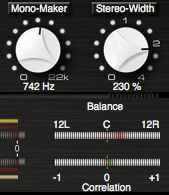
– a Trick to Enhance Stereo Image (Especially for Sub Groups or Sends/Returns) is to Push “Stereo Width” into “Phase Problem” (Above 100%), but then Dial Back “Phase Problem” with “Mono Maker” (Up to 300-500 or Higher)
– Mastering Engineers can Make More Out of a “Dull Mix” than Out of a Too “Bright Mix”
– Likewise, it’s Better to have “Less” in Bottom End than having too Much
– 1/6 Oct Spectrum Meter is Effective to Detect Single Frequencies that are Too Hot and to Dial In the Low End
– the Mix Should have its Highest Peak between -12dBFS and -3dBFS (better -12dBFS to -6dBFS)
– DR of 12 (Max 10 / Min 14)
– Close Your Eyes and Sharpen the Focus on What you are Hearing (Use Visual Analyzer Tools Only to Compare)
– Use Dedicated HQ (Mastering) Plugins and / or Settings (Oversample)
– the Ear is Most Responsive from 1k to 5k
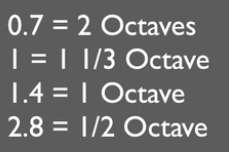
– Q Factor Ranges are 0.7 = 2 Octaves, 1 = 1 1/3 Octave, 1.4 = 1 Octave, 2.8 = 1/2 Octave
Leave a Reply