
General
– Listen the Adjustments at different Spots of the Track
– Always Makes Use of Plugins Maximum Oversampling Options
– use “Master” Versions if available (such as Elysia Alpha Master, Museq Master)
– use a Dynamic Range Meter to See how Far you can Push the Limiter until the Transients Hit the Max Output Volume (which is the Number you Dial into the Limiters Output Ceiling)
Workflow
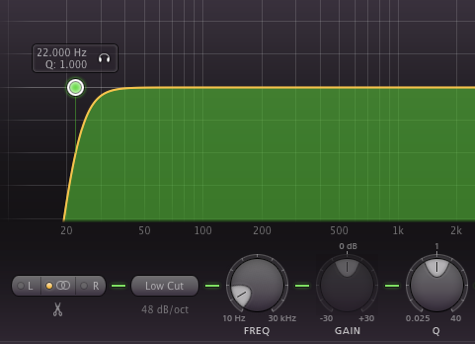
1) Linear Phase EQ = Surgical Purposes, also Low Cut at 22Hz with Steepest Filter
2) Aesthetic EQ I = Colorful Hardware EQ if Possible (e.g. SPL Vitalizer Tube EQ)
3) Tape Saturation (e.g. Studer A800)
4) Aesthetic EQ II = Pultec EQ (Software)
5) Aesthetic EQ III = Manley Massive/Passive (Software)
6) Depth & Width = Design the Ambience Portion of the Mix (K-Stereo)
- e.g. Dip only Room Signal to clean LMF and cut a little of Room/Reverbs making it brighter at the same time
- decrease overall mono and increased the overall Stereo, just a little
- then add overall Ambience through K-Stereo Plugin
- Low Cut on Room Signal
- Dip 9db at 135 Hz
7) Transient Enhancer
8) Multiband Dynamics / Limiting in M/S Mode
9) M/S Correction = In Case you Did the Last Step (Multiband Dynamics) in Stereo
10) Limiter = Use a True Peak Limiter to Match EBU R128 (Last Step Before Dither)
a) Use Loudest Part of the Song
b) Set the Output Ceiling in Limiter to -0.5dB
c) See the Peaks you get and Make sure that Hot Peaks are just a Few Exceptions (e.g. -1.3dB should only be Occasionally)
d) Increase Limiter so the Transients Hit the Max Output Volume without Distorting
e) Also Check the Dynamic Range of Material as you Increase Limiter, go for DR of 12 (Range of 10 – 14)
Leave a Reply